The way you report a speed camera depends on which TomTom product you are using.
TomTom sat nav
For reporting speed cameras you first need to ensure the service is enabled on your device. You can then report speed cameras with a single tap.
Follow these steps:
- Make sure you have an active Speed Camera subscription. To purchase this, go to TomTom.com/services.
- Set up a Bluetooth® connection between your sat nav and your smartphone. Click here for more information on how to set up this connection.
- Enable speed cameras on your sat nav. Steps depend on which device you are using:
- Option 1:
Go to Settings > Sound > Alerts & Sounds and make sure Cameras is selected. - Option 2:
Go to Settings > Sounds & Warnings and make sure Speed cameras & hazards is selected. - Option 3:
From the Main Menu, go to LIVE services > Speed cameras / Safety alerts and tap Enable report.
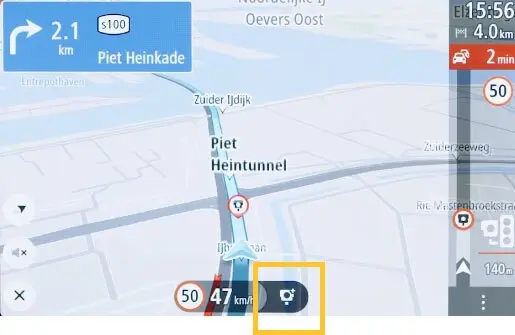
- To report a speed camera on your route tap the speed camera icon next to your current speed at the bottom of the guidance view.
TomTom app
You can report a speed camera by tapping the report button in the bottom right of the driving view. The driving view is shown once the app detects that you’re driving or when you have planned a route.
- Tap the report button in the bottom right of the driving view.

- Tap Speed camera or Mobile camera.
GO Expert app Android
To report a speed camera, follow these steps:
- In Settings > Sounds & Warnings > Alerts & Sounds, make sure Cameras is selected.
- Report a speed camera on your route by tapping the speed camera icon next to your current speed at the bottom of the guidance view.
You cannot report a speed camera in Android Auto™.
GO Expert app iOS
To report a speed camera, follow these steps:
- In Settings > Sounds & Warnings, make sure Speed Camera Warnings is selected.
- Report a speed camera on your route by tapping the speed camera icon next to your current speed at the bottom of the guidance view.
Tip: To use Siri you can select Report Speed Camera in Settings > Siri Shortcuts > Add.
You cannot report a speed camera in Apple CarPlay®.
Report using MapShare Reporter
You can also report speed cameras using MapShare Reporter. Log in to your TomTom account. Then tap the location of the speed camera on the map and choose Speed cameras top left of the screen.
More: About MapShare Reporter.
See also: TomTom Speed Camera service and the law