If you have forgotten the password of your TomTom account or have access issues, try to reset the password.
You can reset the password on the TomTom log in page or by following these instructions:
- At the top of this page, click Log in.
- Click Forgot my password.
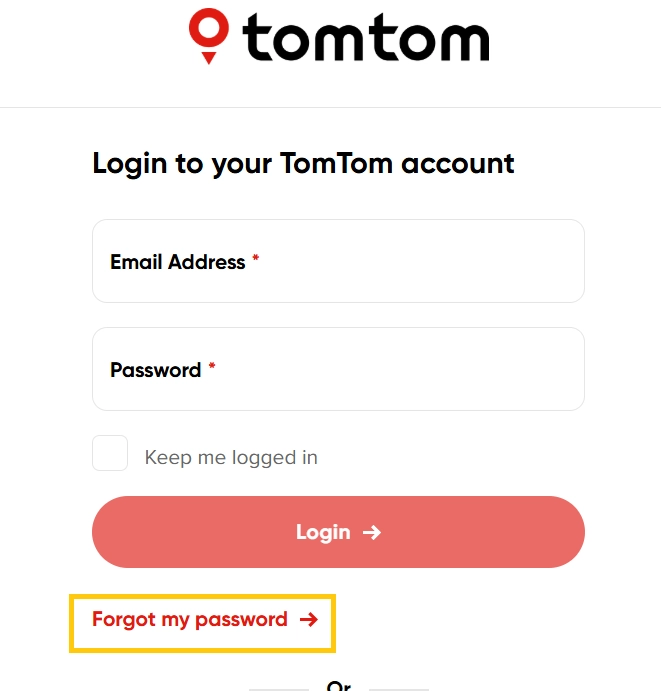
- On the next page, enter your email address and click Send.
A system generated link is sent to your email address to set a new password. The link will be active for 3 hours.
Common issues with logging in
Incorrect email or password
Ensure that you are using the correct email address that is associated with your TomTom account.
If you think you may have an incorrect password, you can reset the password using the above steps.
Password reset email is not received
If you have not received the password reset email, try refreshing your inbox and check the spam or junk folder. This may take few hours to arrive. The email is sent from noreply@transactional.tomtom.com. We recommend adding this email address as a safe sender.
You can also use a different browser or try clearing your browser cache if the email is not received.
Password reset fails, please try again later
If you see Password reset fails, please try again later when resetting your password, try using a different browser or clearing your browser's cache and cookies. If the problem persists, request a new password reset email and use the latest reset link. Older links may have expired.
Log in link is expired
The link in the forgot password email is expired, if you open the link after 3 hours or the link is broken. In these cases, you can request a new password reset email and use it before the link expires.
Invalid log in/ Log in attempts remaining [x]
You may get this error, if the details are incorrect and the maximum number of attempts are used. Failure to log in can lock your account for 60 minutes. Ensure that you are using correct the email address and reset the password if required.
Your account is locked for security reasons. Please try again later
This error message appears when the maximum log in attempts is exceeded. Your account gets locked for 60 minutes. If you click on forgot my password and reset it, you can log in immediately or you can wait for 60 minutes to try again.
The login session has expired. Please try again
If you stay on the log in screen for too long without logging in, you can get this error message. You can refresh the browser and try to log in again.
Update password failed/ Update profile details failed
We recommend using a different browser to try again.
How do I know which email address I have used for my TomTom account?
You may have received a confirmation email when you created an account.
I do not have access to my email account anymore
If you can’t access your email account, you can create a new TomTom account using an active email address and then link your device to the new account.