You can get voice instructions for the planned route on the navigation device. You can select the voice of your choice from the settings.
Following these steps helps you properly set up voice guidance on newer Wi-Fi® devices.
- Tap the main menu and go to Settings.
- Tap Sound and then Voices.
- You can select a voice from the list.
Note: To hear read aloud street names, select a computer voice. The computer voice can read street names directly from the map.
You can also find Guidance prompts under Sound to get read aloud instructions. Toggle the option to turn on the instructions.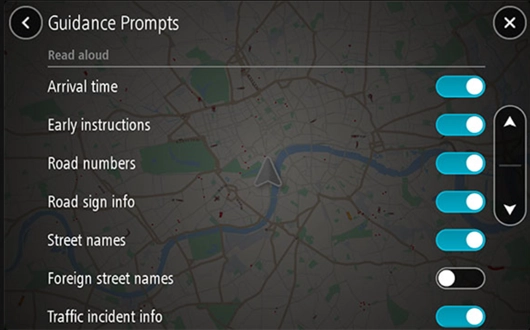
Other Wi-Fi® devices:
- Tap the main menu and go to Settings.
- Tap Voices.
- Select Choose a voice.
- You can select the voice from the list.
You can also find read aloud instructions under Voices. Toggle the option to turn on the instructions.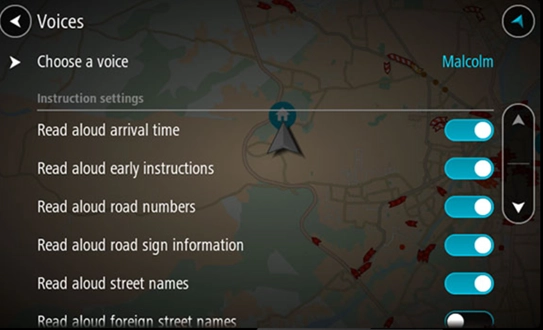
To download any different voice, see the webshop page.
Voice instruction is not working:
If the option for voice instruction is disabled, the instructions may not work on the planned route. It is available in the main menu screen.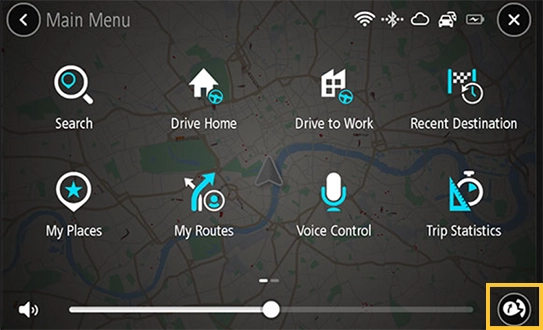
 |
This button shows voice instructions are enabled on your device. |
 |
This button shows voice instructions are disabled on your device. You may not get spoken instructions, but you can get instructions like traffic and other sounds warnings. Tap on the icon to switch on voice instructions. |