Next to the barcode sticker at the bottom of your device, you can find the serial number or in the Settings of your device. The location of the barcode may differ depending on the device model. It’s usually at the bottom. Watch the video to find the location.
It consists of 12 characters and starts with one or two letters.
Example: AB1233C56789
To find the serial number in the Settings on your device, follow the steps below.
On the same page you also find the model name, installed software version, installed map version and other details of your device.
- Go to Settings in the main menu.
- Tap System.
- And then tap About.
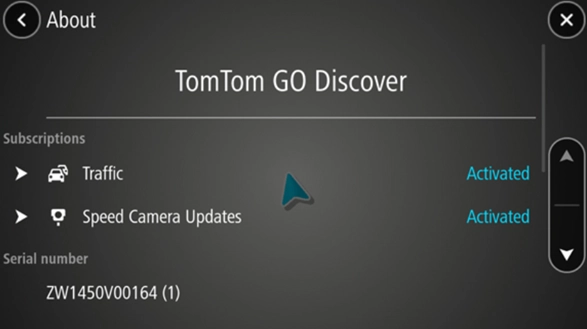
- Scroll down to find serial number, installed software version, installed maps, subscriptions, and other details.
Older devices:
- Go to Settings in the main menu.
- Tap Me and my device.
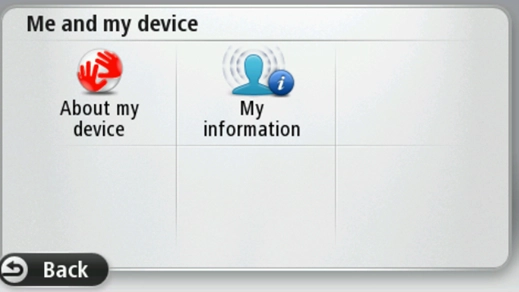
- Tap About my device.
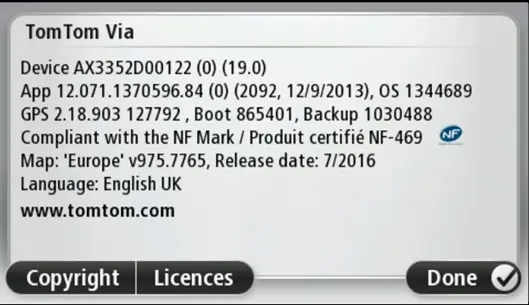
- You can find serial number, software version, installed maps.
Watch the video
This video shows where to find the serial number of your navigation device. Your serial number can be found on a barcode sticker outside of your device, and this video shows different locations depending on your device model. This information is also available through the menu option of your device.